
Designing experiments often starts with designing plates. And for many teams, that still means spreadsheets, handwritten notes, or last-minute edits right before running an assay.
Louis Pasteur wrote, “Chance favours the prepared mind.” While he wasn’t talking about plate maps, the principle holds: in plate-based assays, careful preparation often begins with plate design—and it can make the difference between clean data and a costly rerun.
Pre-mapping your plate turns experimentation from “trial-and-error” into a controlled, scalable system. Reducing waste, increasing confidence, and enabling faster analysis.
As experiments scale, your assay throughput rises, and the cognitive load rises with it. Keeping track of which well you’ve already pipetted into is hard enough with lab chatter and email notifications pulling your attention. That’s why it’s good lab practice to map treatments and replicates in advance. It helps you execute the assay consistently, reduce preventable mistakes, and protect the integrity of the data.
That’s why we’ve built Plate Designer.
What is Plate Designer?
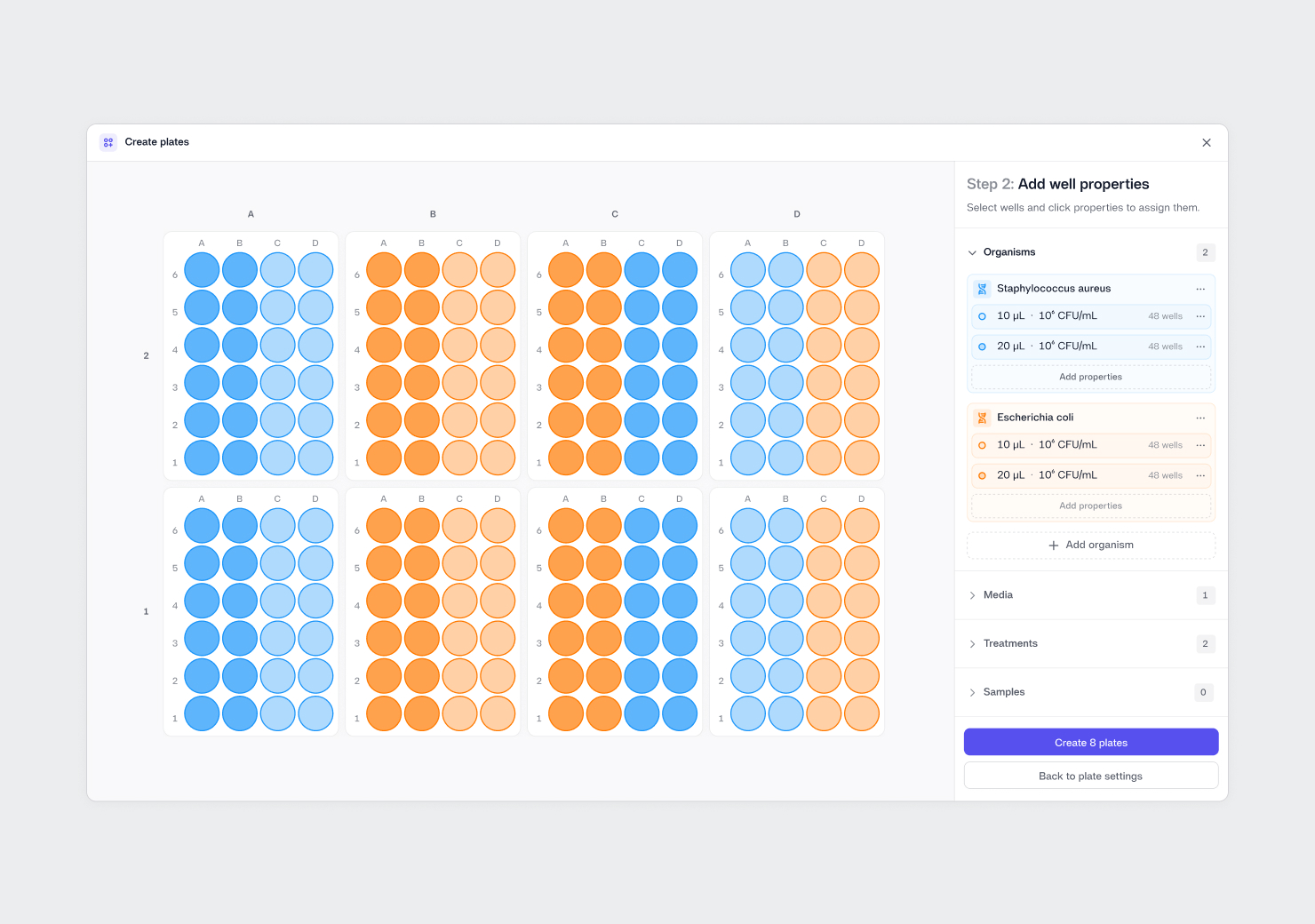
Plate Designer is a dedicated tool in the Reshape platform to assist with mapping out plates for structure and consistency.
This applies both across plates, where you are mapping replicates and treatments across multiple Petri dishes, and within a single plate, whether it’s a 6-, 12-, 24-, 96-, or 384-well format. With this tool, you can work with plates the way you think about them: in groups, patterns, or sections.
You can quickly apply key setup parameters like Organism, Media, Treatment, Sample, and Control Type across multiple wells at once. That includes full rows, full columns, or any custom selection across a plate or tray.
In practice, this is about removing the frustrating and erroneous part of collecting data on plate-based formats. Instead of building layouts one plate at a time, you can design patterns that the lab can use every day. Maintaining the same map of controls, replicates, and treatment groups.
The payoff is immediate at the bench. When your layout is defined clearly up front, it’s easier to execute without stopping to remember what goes where, easier to spot mistakes before they happen, and easier for someone else to pick up the protocol midstream if needed. Plate layouts come together in minutes, even as the design gets more complex, and they stay consistent across repeats.
The result is a plate definition that is easy to review, easy to adjust, and reliable to reuse, so you spend less time rebuilding the same setup and more time generating interpretable data.
How it fits into your workflow
Plate Designer can be regarded as step one of your assay—sitting upstream of incubation, imaging, and analysis.
That means your plate is fully defined before any measurements are taken. You decide how many replicates you need for each treatment and condition, place the right controls, and lock in the layout up front. When results start flowing in, the metadata is already attached, so you can interpret the data with full context for every well, including conditions, controls, and replicates.
Over time, this becomes a practical foundation for scaling. You can run more plates, involve more people, add more timepoints, and still keep layouts consistent and data traceable.
What’s next
Plate Designer is an incremental step, not the final destination.
We’ll continue to expand it carefully, guided by how teams actually design and run plates in real lab environments.
Existing Reshape users can get started right away, just navigate to Plates in the menu or click this link. New user? Don't worry, you can sign up and try Plate Designer at no cost using here.